

Station d'accueil universelle triple écran 4K USB-C ou USB-A
About this item
Se marie bien avec
EXPÉDITION LE JOUR MÊME commandez avant 11 h (HNE)
Livraison gratuite pour les commandes de plus de 50 $
Support technique
Retour sous 30 jours
Garantie d'un an
Station d'accueil universelle triple écran 4K USB-C ou USB-A
Détails du produit
Transformez instantanément votre ordinateur portable Windows ou Mac, y compris Intel ou M1/M2/M3, en un ordinateur de bureau multi-écrans grâce à la station d'accueil USB-C UPTab 4K Triple Display, connectée par un seul câble. Intégrant les innovations de l'USB 3.2, cette station est l'une des premières à utiliser les modes DisplayLink et DisplayPort « Alternate Mode » de la spécification USB-C pour la sortie d'affichage principale. Elle est également l'une des premières à prendre en charge l'alimentation USB 100 W pour votre ordinateur portable, permettant ainsi de recharger un ordinateur portable, un 2-en-1 ou une tablette Windows qui y est connecté. Tous les ports USB-C ne proposent pas le mode DP Alt ou la charge PD. Un port USB-C, USB 4, Thunderbolt 3 ou Thunderbolt 4 entièrement compatible est requis pour cette station d'accueil.
Connexion hôte USB-C pour trois moniteurs 4K :

Il existe des limitations lors de la connexion à un hôte USB-A 3.2 (USB 3.0), jusqu'à deux moniteurs, et ne peut pas charger un ordinateur portable.
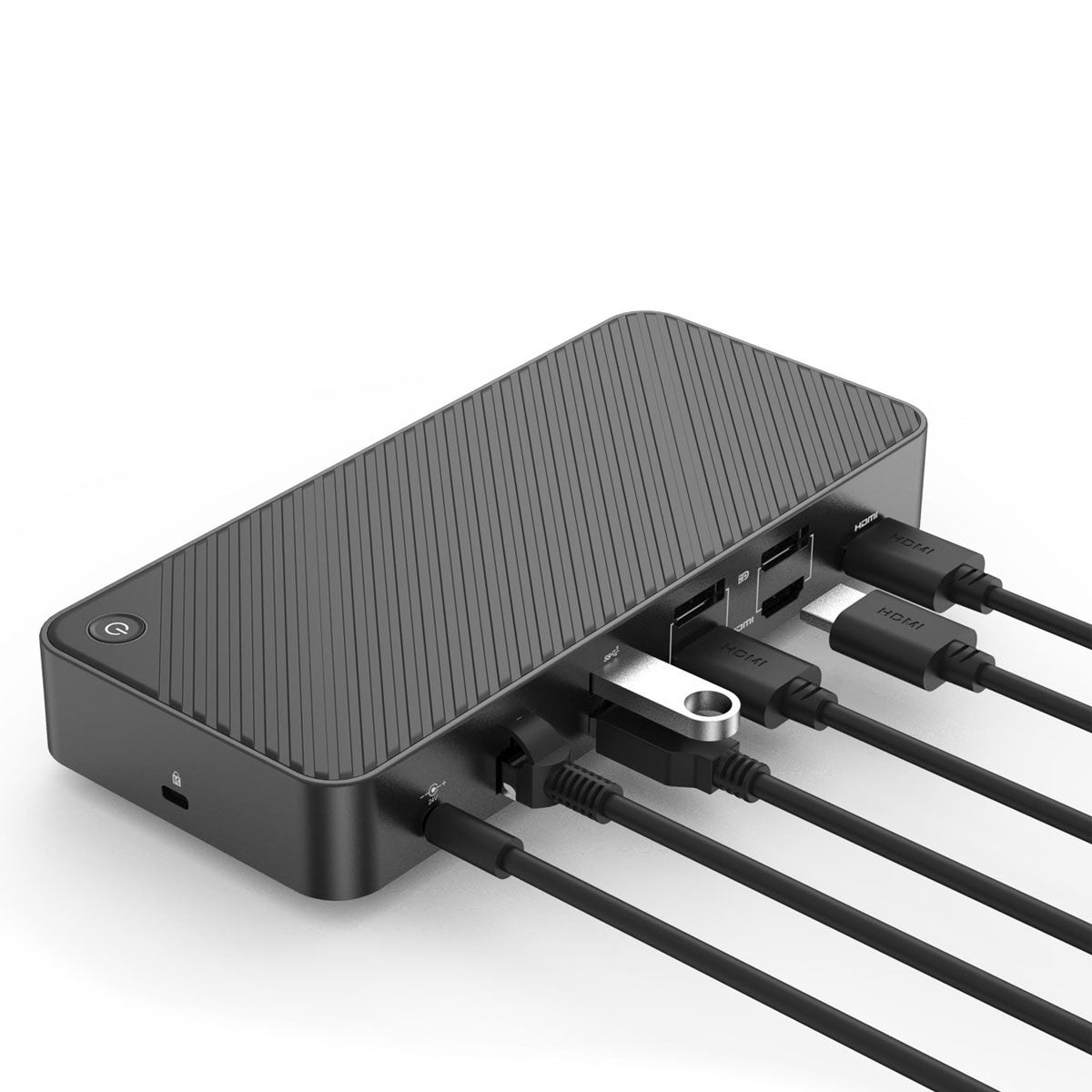
Installation facile : Grâce à sa conception Plug-and-Play, tout est branché et connecté avec un seul câble. Branchez simplement le câble de la station d'accueil pour charger votre appareil et accéder instantanément à vos écrans externes, claviers, souris et autres périphériques. Transformez votre ordinateur portable ou tablette en ordinateur de bureau et évitez les câbles encombrants sur votre bureau. Marque locale américaine UPTab. Conçu pour booster votre productivité.
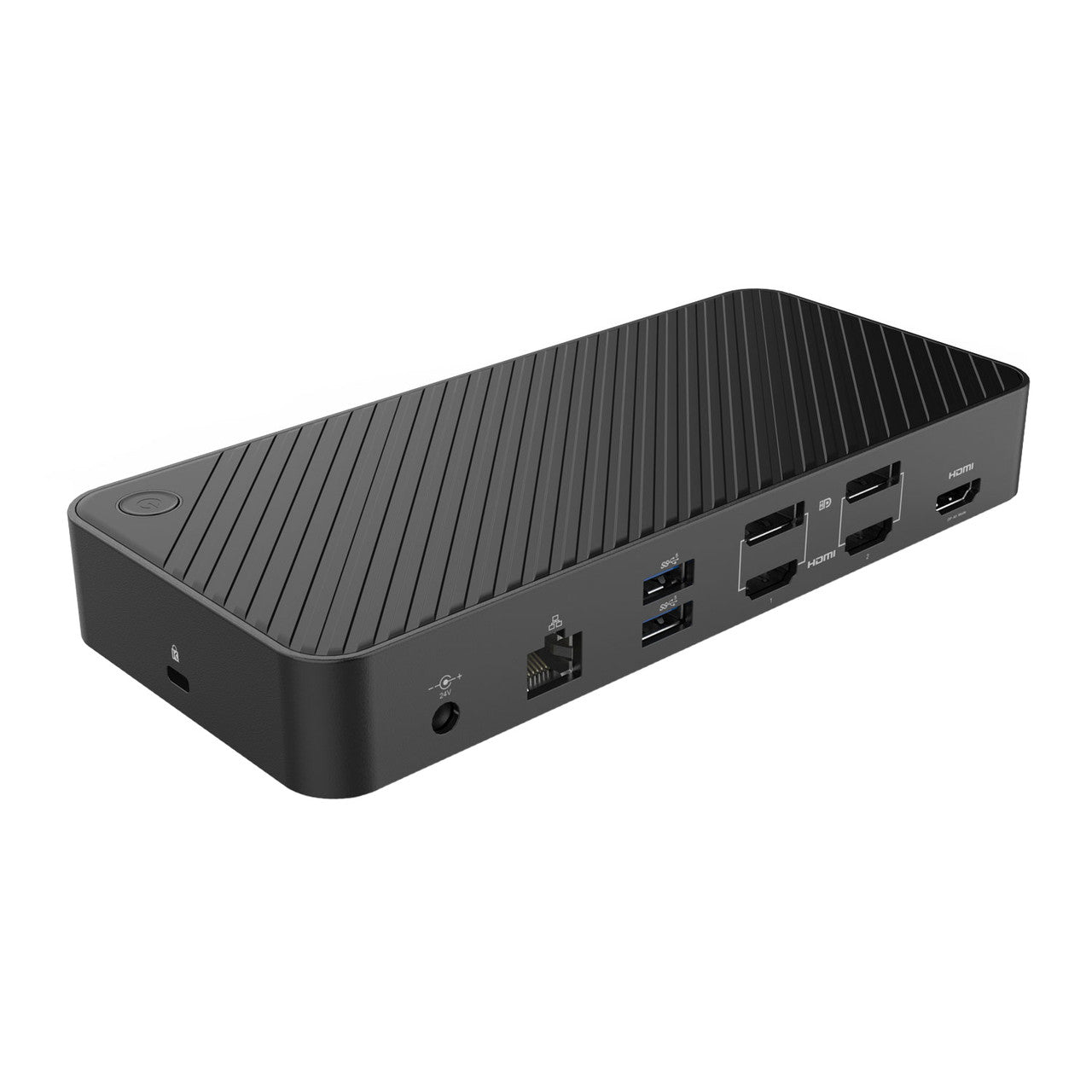
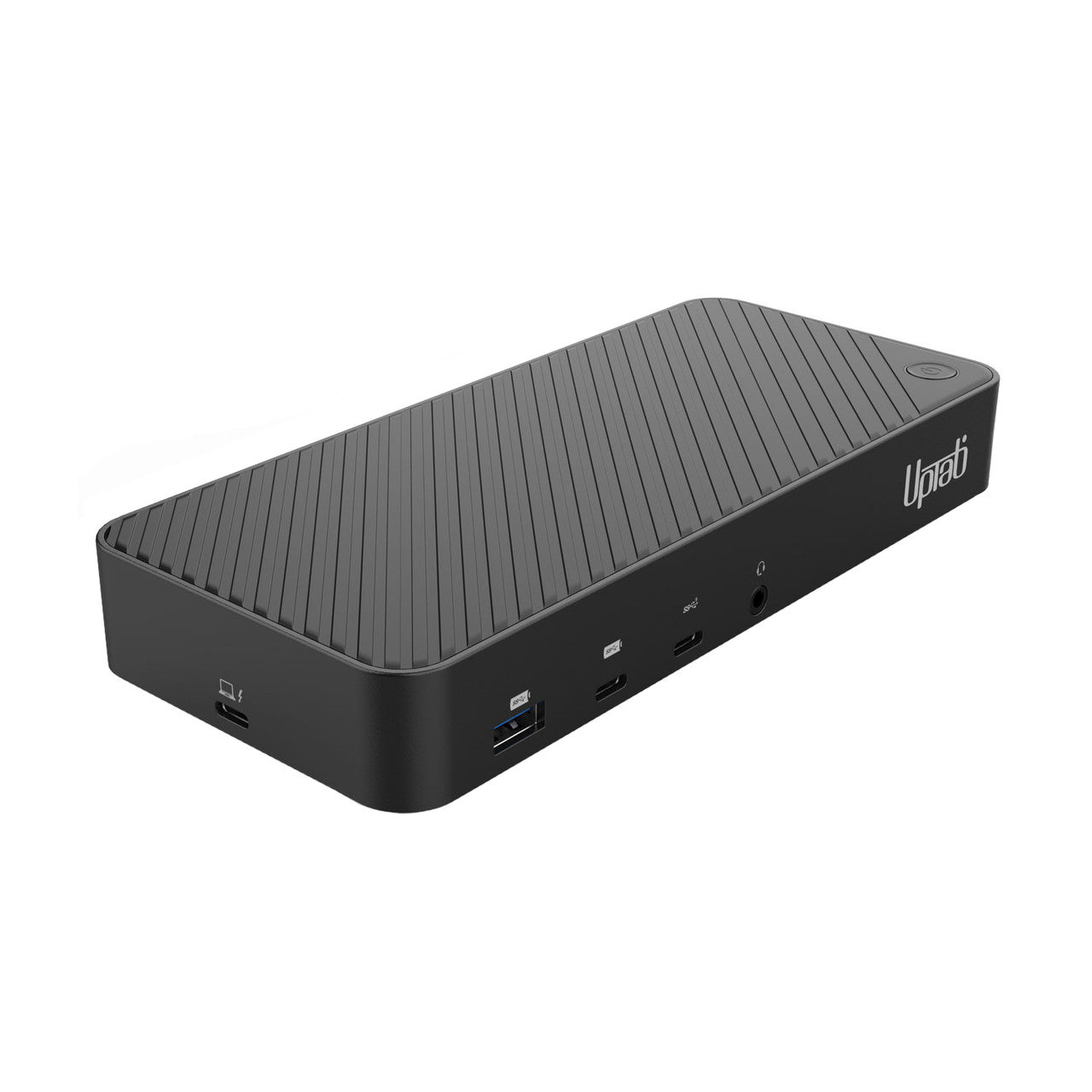
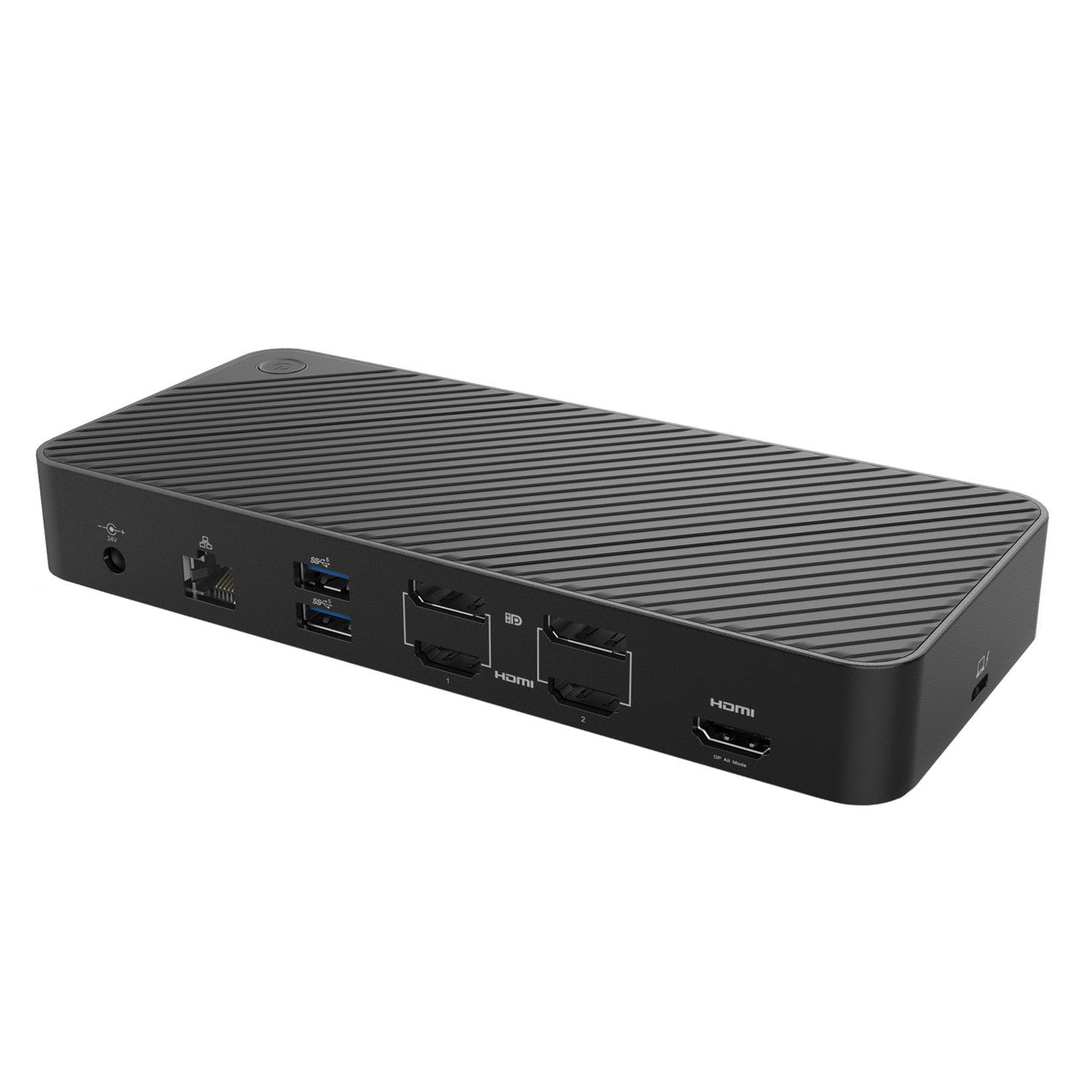
Station d'accueil UPTab DisplayLink. Face avant et arrière :

- Entrée : USB-C 3.2 Gen 2 ou USB-A 3.2 Gen 1 (USB 3.0) - Câbles USB-C et USB-A inclus
- USB-A 3.2 Gen 2 (10 Gbit/s avec charge BC 1.2)
- USB-C 3.2 Gen 2 (10 Gbit/s avec charge BC 1.2)
- USB-C 3.2 Gen 1 (5 Gbit/s)
- Port audio et microphone AUX/MIC 3,5 mm
- Puissance délivrée à un ordinateur portable de 100 W. Puissance totale délivrée de 130 W (24 V/5,4 A).
- Gigabit Ethernet (10/100/1000)
- 2x USB-A 3.2 Gen 1 (5 Gbit/s)
- DisplayPort ou HDMI : 4K à 60 Hz (3840 x 2160)
- DisplayPort ou HDMI : 4K à 60 Hz (3840 x 2160)
- HDMI 4K à 30 Hz (3840 x 2160) - Mode DP alternatif
- Emplacement K pour un verrou pour ordinateur portable de type Kensington
Chargez les smartphones et autres appareils avec deux ports de charge frontaux en aval avec BC 1.2 pour les appareils USB-A et USB-C.
Les ports de charge rapide prennent en charge la charge permanente afin que les appareils se chargent, qu'un ordinateur portable hôte soit connecté ou non.
Connexion hôte USB-A (USB 3.0) pour deux moniteurs 4K :

Écrans haute résolution : Gagnez de l'espace sur votre écran pour plus de productivité. Les écrans haute résolution (DisplayPort, pas HDMI) révolutionneront votre gestion des onglets et de votre flux de travail.
Fini les images granuleuses et les écrans minuscules. Augmentez la surface de votre écran grâce à cette station d'accueil et gagnez du temps sur vos tâches les plus productives.
Remarque : Pour obtenir la 4K 60 Hz, chaque écran et câble connecté doivent prendre en charge la résolution et la fréquence de rafraîchissement souhaitées. Les anciens ordinateurs portables USB-A ne prennent en charge qu'une configuration à deux écrans.
Compatibilité:
Apple M3 : Notre station d'accueil DisplayLink vous permettra de surmonter la limitation d'un seul moniteur externe dans le nouveau MacBook Air\Pro d'Apple avec M3 et vous permettra de connecter jusqu'à trois moniteurs simultanément avec jusqu'à 4K à 60 Hz et HDR.
Compatibilité ordinateur portable : Compatible avec la plupart des ordinateurs portables et de bureau fonctionnant sous Windows 11/10/8.x/7 et macOS avec puces Intel ou M1 et M2 avec 10.14+. Le boîtier comprend un câble USB 3.0 et USB-C pour connecter la station d'accueil à votre ordinateur portable.
Non compatible : Non compatible avec : les systèmes d’exploitation Windows basés sur ARM (tels que Surface RT).
Compatibilité des écrans : Prend en charge deux écrans haute résolution jusqu'à 4K 60 Hz (3840 x 2160 à 60 Hz) lorsqu'ils sont connectés à des écrans compatibles. Malgré la rétrocompatibilité, il est important de noter : • Les écrans DisplayPort 1.2 prennent en charge jusqu'à 4K 60 Hz, • Les écrans DisplayPort 1.1 prennent en charge jusqu'à 4K 30 Hz, • Les écrans HDMI 1.4 prennent en charge jusqu'à 4K 30 Hz.
Compatibilité logicielle : DisplayLink est une technologie flexible et polyvalente, idéale pour la plupart des utilisateurs. Actuellement, sous macOS 12.0 Monterey, pour afficher du contenu DHCP (protégé contre la copie) comme Blu-ray, Netflix, Prime, iTunes, Hulu, Disney+, etc., vous devez désactiver l'accélération matérielle dans les paramètres de Google Chrome ou utiliser les navigateurs Firefox ou Opera.
Alimentation et charge : l'alimentation de votre ordinateur portable ne peut être effectuée que lorsque vous utilisez l'USB-C (assurez-vous que votre ordinateur portable peut être chargé via un port USB-C) jusqu'à 100 watts d'alimentation vers un ordinateur portable.
Caractéristiques:
- Gigabit Ethernet
- 10/100/1000
- USB-A
- Un port USB-A 3.2 de 2e génération 10 Gbit/s (avant) (prise en charge de la charge BC 1.2)
- Deux ports USB-A 3.2 Génération 1 5 Gbit/s (arrière)
- USB-C (Type C)
- USB-C 3.2 Génération 1 - Vitesses de transfert de 5 Gbit/s (avant)
- USB-C Génération 3.2 Génération 2 - 10 Gbit/s (avant) (prise en charge de la charge BC 1.2)
- Connexion hôte USB-C (latérale)
- HDMI
- HDMI 1 : 4K à 60 Hz (3840 x 2160)
- HDMI 2 : 4K à 60 Hz (3840 x 2160)
- HDMI 3 : 4K à 30 Hz (3840 x 2160) (mode DP alternatif)
- DisplayPort
- DisplayPort 1 : 4K à 60 Hz (3 840 x 2 160)
- DisplayPort 2 : 4K à 60 Hz (3 840 x 2 160)
- Microphone auxiliaire AUX/MIC
- Port audio et microphone 3,5 mm
- Alimentation CC
- Alimentation de 100 watts pour ordinateur portable
- Puissance totale délivrée de 130 watts (24 V/5,4 A)
- Verrou Kensington
- Un verrou Kensington
Compatibilité:
- Prend en charge Windows 11, 10, 8.x et 7, ainsi que macOS Intel ou M1/M2 et M3 10.14+. ARM et certaines anciennes versions de macOS ne sont pas pris en charge.
Dans la boîte :
- 1x Station d'accueil universelle triple écran USB-C ou USB-A
- 1 câble USB-C vers USB-A 19 1/2" (500 mm)
- 1x câble USB-C vers USB-C 19 1/2" (500 mm)
- 1x bloc d'alimentation CC
- Documentation
Pour toute question, n'hésitez pas à nous contacter. Nous vous répondrons dans les plus brefs délais, sous 24 heures en semaine.
-
Informations d'expédition
Nous traitons et expédions la plupart des commandes le jour même. Les délais de livraison varient selon le mode de livraison sélectionné lors du paiement. Veuillez vérifier l'exactitude de votre adresse de livraison pour éviter tout retard.
-
Assistance clientèle
Notre équipe est là pour vous aider ! Pour toute question ou assistance, contactez-nous par e-mail ou via notre formulaire de contact. Nous vous répondrons dans les plus brefs délais.
-
FAQ
Quand ma commande sera-t-elle expédiée ?
La plupart des commandes sont traitées et expédiées le jour même. Le délai de livraison dépend de l'option de livraison sélectionnée lors du paiement.
Quelle est votre politique de retour ?
Les articles peuvent être retournés dans les 30 jours dans leur emballage d'origine avec tous les accessoires inclus. -
Contactez-nous
Vous avez des questions ou besoin d'aide ? Nous sommes là pour vous.
Service client disponible du lundi au vendredi, de 9h à 17h (EST)
Courriel : cs@uptab.com
Téléphone : 1 (877) 333-1505
Ou utilisez notre formulaire de contact , nous vous répondrons rapidement.
Use this docking station when I have to work from home remotely. It pushes my (1) 32" 4k and my (2) 24" monitors with no problem. I don't do anything that is graphics intensive all I do is run a few reports on excel. It fits my needs and it has ports for my accessories as well. The best part is that it charges my laptop when connected to the USB-C.The dock is well made and reminds me of the ones we use at work.I have succesfully used it with my Dell Lattitide 7420, Asus G15, and 2018 Macbook Air.Hope this helps. :-)


This is great dock for either a desktop or laptop! I bought it for use for my desktop, but it's small enough to fit into a bag if you need to take it with you on the go.This dock actually supports thunderbolt which is great! 40GB/s is more than enough for an external display, a few usb devices, and ethernet. It does come with a short 1ft thunderbolt C-C cable which is nice as those can get pretty expensive. The dock comes with an AC adapter as it does support PD charging with the front USB-C ports. I did take it out to test on my laptop and it does charge the laptop at the same time! Pretty nifty.Fine dock for those on the go or at home. I use it to take my single USB-C Thunderbolt out of my desktop into a functional array of ports. I guess it may be more useful with a laptop as I can't use it for displays with my desktop (no iGPU on my system), but having a few extra USB C and 3.1 ports is huge, especially when they all run at 10(?) GB/s.


I have a unique situation, and was looking for a nice thunderbolt hub that, hopefully, would've cause any problems. My situation is I have a 2011 27" iMac, which has an upgraded Nvidia graphics card, and so, using OpenCore Legacy Patcher, I'm able to run the latest Mac OS Monterey on it. The machine is really for my kids, and their school work, but my nearly 14 year old daughter has really gotten into video lately. As a result, I purchased an Apple Thunderbolt 2-3 adapter, in hopes some of the latest thunderbolt 3 devices could be used with the iMac. I'd previously tried a Plugable thunderbolt 4 hub, which worked, but, for some reason, when plugged in it would have a grey screen when booting for far too long. The Mac would eventually start up, but my kids got annoyed with how long it would take to do so. As a result, I started looking for another solution.I came across this hub, and, considering the price, thought it might be comparable to the Plugable hub, although this offered far more ports. It touts being usable for thunderbolt 3/4, so I gave it a go. Sadly, plugging it into the Apple Thunderbolt adapter didn't do a thing. This certainly powered on due to the extremely large power supply it comes with, but I couldn't ever get any devices plugged into it to be recognized on the iMac (I could successfully do so using the Plugable hub). I think, ultimately, it's due to this being a USB 4 hub in actuality versus a thunderbolt hub, despite pricing being very similar.Although it didn't end up working out for my ideal use case, I have been able to find it a home with my Mac Studio I use as my work daily driver. Plugged it in there, and, of course, anything plugged in fired right up. I should note, in addition to the huge power supply it comes with, it does also come with a USB-C to USB-C cable, as well as a USB-C to USB-A cable. I merely used the USB-C myself, and have been able to get near expected speeds with a Samsung T7 SSD plugged into it. I have a huge LG display, so really don't have a use for all the additional HDMI ports it offers. This does seem like a solid hub for what it is, although a little pricer than comparable thunderbolt hubs you can get from OWC, for instance. If you're in the market for something like this, it's not a bad choice at all.

Easy to set up a News. Orc exactly like I expected it to. Which is fantastic.
Using this with PC Laptop to get full desktop of 3 4K displays, working great!
This works great with my Dell Inspiron. Just plugged it in and it keeps my Laptop charged and all devices connected with just a single cable. This is exactly what I needed!I have a monitor, network connection, mouse and keyboard hooked up to this all without issue. No drivers needed, just plugged it in and ready to go. Very simple very easy.
I needed something to connect my Macbook pro to two 4k 27" displays, and this has been nothing but perfect for my needs. Im constantly going between my house and my work where I also tend to connect at least two monitors at a time. Having used a cheap docking station before, it was always running super hot and to the point it would scare me. This one has a dedicated fan and that seems to keep this quite cool! Having the USB 3.2 is nice as well as I tend to have a lot of peripherals in use.A well built docking station that has "just enough of what you need, and absolutely nothing extra at all!"
I got this to use with my Alienware m17 gaming laptop with a 3080ti. I mainly got it to use with my 4k TV in my game room. I also used it with an Intel 27inch iMac which worked great.Setup is simple and both Windows 11 Pro and MacOS had no issues seeing this docking station. Having a few extra ports is always I good thing, and each one worked flawlessly.Setting up my gaming laptop to my 4k TV was simply connecting it and configuring the display to mirror. I had no issues running my TV at 4k with this docking station. My kids and I have used it everyday for several weeks now with no issues at all.The build quality is excellent and it's not as heavy as I thought it would be. Due to the weight and size, it's easy to move around with very little effort.Overall, I am pleased with this docking station. I've used and own several brands of docking stations, and this is is as good as some of the more expensive brands I own.
This review is for UPTab Thunderbolt Docking Station (ASIN: B09R17WR43). I am converting over my PC and laptop to Thunderbolt, so I am working on setting up a Thunderbolt environment. This docking station was interesting for its compact size and number of connections, particularly the video connections. It’s very rare that I see a docking station that has 2 x HDMI and 2 x DP outputs. You can’t use all four at the same, but you have the ability to mix and match two of them. You can support dual 4K @ 60Hz, which I rarely see. I’m also surprised to see 2 x USB-C on the front. Normally, I never see more than a single USB-C. It would have been a big bonus if at least one was Thunderbolt. This way I could plug an external Thunderbolt enclosure into it. I tested this with a 4K @ 60Hz monitor, and it worked just fine. I don’t have dual 4k monitors though. Also, the power supply is quite large. This is a good hub, but it’s not perfect. I am still searching for the perfect Thunderbolt hub. However, this can be said of pretty much every hub I have seen so far. Depending on your use and connections needed, this hub could work out perfectly for you.
This docking station is perfect for a small workspace. It is small and sturdy; its metal outer shell makes it easy to travel with without worrying if it will damage or crack. Today, most of these docking stations are made out of metal, but the difference is that some metals are prone to overheating while this one has a self sustaining and very capable fan that keeps the exterior nice and cool while operating. Additionally, it is heavy enough to weigh down on your tabletop without moving too much but light enough to throw in a tote bag for traveling. Further, the best quality about this is the consolidation of wires with its layered port design. Instead of all of the ports being one next to the other, they are layered on top of one another which keeps the device itself nice and small while still providing ample power. I use this with my Macbook Pro and I have no issues with connectivity or glitching– in fact, it has made transferring data onto my desktop PC much easier and faster.This is also extremely easy to set up. It comes in reliable and durable casing that is both protective and not wasteful as it doesn’t come with any extra plastic baggies or annoying stickers. The directions ares straightforward and easy to follow, but honestly, you don’t really need them. This is as simple as plugging in and getting started. I have this attached to my monitor constantly so anything I plug into the loose USBs just pops up right away on the monitor– this has made photo and video uploading from my camera a breeze.Overall, this is one of the best small docking stations on the market. If you’re looking to consolidate desk space with a sleek and durable device, this is the one for you!
*Installation of driver is easy*Connects to monitors without issue*Gets a bit warm if left on for a while but does not get hot*Has on/off button to turn off the deviceMy only wish is that the on/off button could be used to boot up my workstation.
It's nice ,sturdy, versatile. Doing many things at the same time. Fantastic
Livraison gratuite à partir de 50 $
Expédition le jour même pour la plupart des commandes